USD 10.00

Handing an item to a player still means typing /giveitem 3 advancedlockpick 1 and getting the spelling right from memory. Get it wrong and nothing happens, with no hint as to why.
Handing an item to a player still means typing /giveitem 3 advancedlockpick 1 and getting the spelling right from memory. Get it wrong and nothing happens, with no hint as to why.
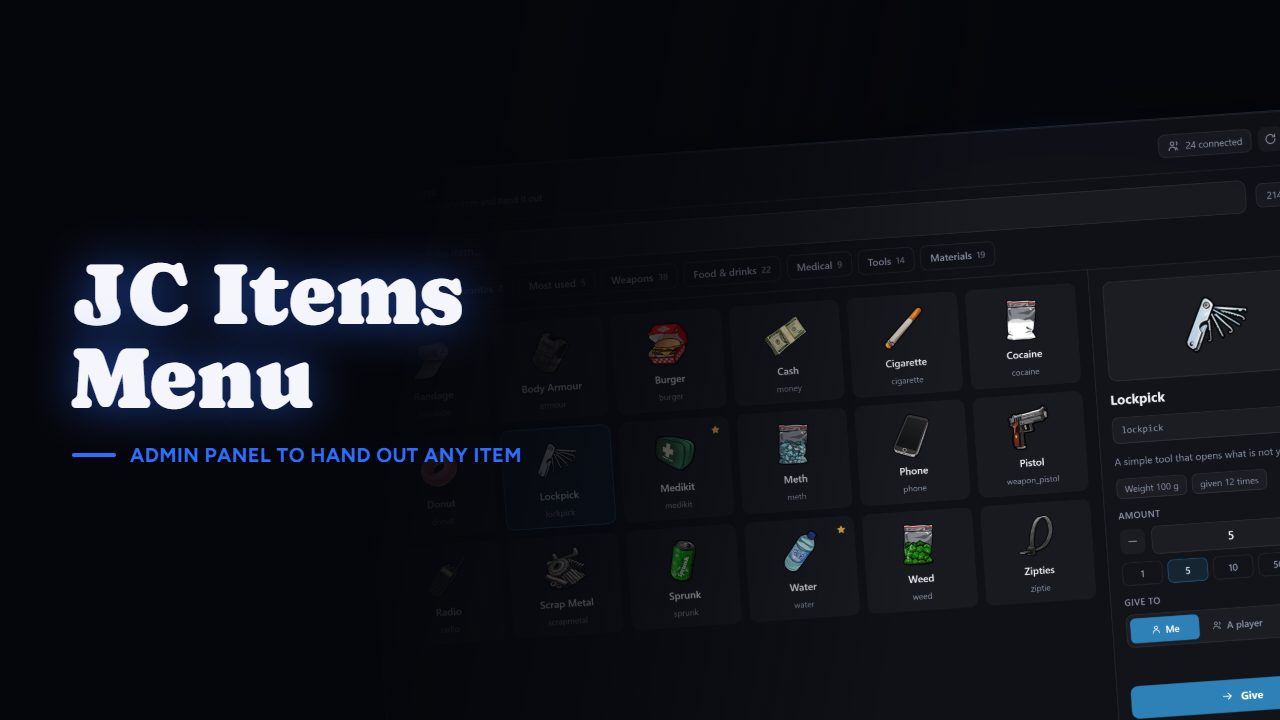
JC Items Menu lists every item on your server with its real image, read straight from your inventory resource. Type a few letters, press Enter, done.
This is the part that matters and the part most admin menus get wrong. A normal give command fires and forgets: if the player's inventory is full, the item quietly disappears and nobody finds out until they complain.
Here every give counts the item before and after. If the inventory refused it, you're told it failed. Nothing is silently worked around and nothing vanishes.
Open it, type to filter, press Enter to take the first result, press Enter again to give it. Escape steps back one level, from the item to the list, from the list to closed. You never have to touch the mouse.
There's an amount field with shortcut buttons, a cap you set on how much can go out in one action, and a button to copy an item's internal name when you need it for a config somewhere else.
To yourself, to one player picked from a searchable list of who's connected, or to every connected player at once, which asks you to confirm first and can be switched off entirely.
The receiving player gets a notification, and every give is written to the server console and to a Discord webhook if you want one, with who gave what to whom.
Favorites and a most-used list, both stored per admin. After a week the items you reach for constantly are one click away instead of buried in a catalogue of several hundred.
/itemsreload rebuilds the item list without restarting the resource, for when you've just added itemsThirteen are detected by name: ox_inventory, qs-inventory, origen_inventory, codem-inventory, core_inventory, tgiann-inventory, qb-inventory, lj-inventory, ps-inventory, ak47_inventory, ak47_qb_inventory, mf-inventory and esx_inventoryhud.
Anything else still works. The inventory's own exports are probed first, and your framework answers for whatever it doesn't publish, so a fork nobody has heard of ends up listing the same items and giving them the same way. If your item images live somewhere unusual, you can point at that path by hand.
Three ways, and you pick which ones count: a framework admin group, a server ACE, or a list of citizenids and identifiers for when you have no admin system at all.
ensure jc-items-menu in your server.cfg, after your framework, oxmysql and your inventory/items in gameThe SQL table installs itself on the first start, and it only holds your favorites and how many times you gave each item. The .sql file is in the box if you'd rather run it by hand.
config/itemsmenu.lua, the whole configuration: command and keybind, permissions, amounts, give-to-all, blacklist and whitelist, categories, cache and logslocales/, every string the script printsclient/framework/, server/framework/ and server/inventory/, every bridge, so you can adapt it to a framework or inventory that isn't on the listServer exports to check access, read the catalogue and run a verified give from your own scripts, plus a client export to open the panel.
Discord: https://discord.com/invite/qvHK4E6Pya
Showcase: https://youtu.be/6dKZCzd89iQ
Running an inventory that isn't on the list? Ask in the Discord before buying, I answer everything.